Guide · Starting
How to break down a big task into steps you'll actually start
"Biology exam" has been on your list for a week. So has "do my taxes". You know they matter, you know roughly what they involve, and every time you look at them you look away. The problem usually isn't the work. It's that the line on your list isn't something you can do. It's a whole project wearing the clothes of a single task. Breaking it down turns it into a few lines you can start, and the trick is knowing when to stop splitting.
Why big tasks stall
A big task stalls for two plain reasons. It's vague, so starting means deciding first: where do I even begin, what counts as progress, what does done look like. And it has no visible first move, so there's nothing for your hands to do when you sit down. You end up staring at the whole thing at once, which feels like signing up for all of it.
David Allen's Getting Things Done made a simple idea widely known: a list should hold next actions, the next physical, visible thing you'd do, not projects. "Biology exam" is a project. "Read chapter 4" is an action. The difference sounds small on paper and is huge at your desk, because only one of them tells you what to do in the next minute.
There's also the dread. Piers Steel's 2007 review of procrastination research found that how unpleasant a task feels is one of the things that best predicts putting it off. A big, fuzzy task feels worse than any one of its parts. Splitting it doesn't make the work smaller in total, but it makes each piece you face smaller, and the piece in front of you is the only one you have to face today.
How to break down a task, step by step
- Write the outcome in one line. Not "study" but "ready for the biology exam on Monday". Knowing what done looks like stops the list from growing forever.
- List the pieces, in any order. Dump whatever the job involves, the same way you'd do a brain dump. Don't sort yet. Most tasks have four to eight real pieces.
- Start every step with a verb. "Flashcards" is a topic. "Make flashcards for chapter 4" is a step. A verb tells you what your hands do.
- Make each step doable in one session. Roughly under 30 minutes. If a step would take an afternoon, it's still a project; split it once more.
- Find the first physical action. Look at step one and ask what you'd literally do first. Open the PDF. Put the shoebox of receipts on the table. That's where you start.
- Stop when the first step feels startable. You don't need the whole map. If step one feels doable now, stop planning and start. You can split later steps when you reach them.
That last rule matters more than it looks. Breaking down can quietly become a way to avoid the work: color-coding, estimating, reorganizing the list a third time. Planning feels productive and costs nothing emotionally. The test is simple: once you know what to do in the next five minutes, the breakdown has done its job.
If you want one extra nudge, give the first step a when and a where: "after lunch, at the kitchen table, I'll read chapter 4." Gollwitzer and Sheeran's 2006 meta-analysis found that these if-then plans, deciding in advance when and where you'll act, reliably help people follow through on what they meant to do.
Three worked examples
Biology exam. Outcome: ready by Monday. Steps:
- Read chapter 4
- Make flashcards
- Summarise the notes
- Do the practice questions
- Review the hard ones
- Mock test on Sunday
Six steps, each a single session. First physical action: open the textbook to chapter 4. Notice that "review the hard ones" can't be planned in detail yet, because you don't know which ones are hard. That's fine. You'll know when you get there.
Do my taxes. Outcome: return filed. Steps:
- Find last year's return
- Download the income forms
- Gather receipts into one folder
- Fill in the income section
- Fill in deductions
- Check it once and submit
The dread here usually lives in the first step, because you don't know where the papers are. Make it smaller: "look in the desk drawer for last year's return". If it's there, you've started. If it isn't, you've learned something, and the next step is obvious.
Clean the garage. Outcome: car fits again. Steps:
- Clear the floor by the door
- Sort the shelf on the left: keep, give, toss
- Take the give box to the car
- Bag the trash and put it out
- Sweep
Physical jobs split best by area, not by type of item. "One shelf" has an edge you can see, so you know when the step is done.
Breaking down tasks with ADHD
Many people with ADHD describe the same thing: the whole task arrives at once. You think "taxes" and see every form, every receipt and every possible mistake in one flash, and the flash is what makes you look away. Steps that look reasonable on paper turn out to be too big in practice. And planning itself can become the procrastination: an hour spent building the perfect breakdown, then nothing left for the work. None of this is a character flaw. These are a few things many people find help:
- Make the first step embarrassingly small. "Open the doc." "Put the book on the desk." It should feel almost silly to write down. Small enough that there's nothing to argue with.
- Keep the steps where you'll see them while working. A breakdown in a notebook you've closed is out of mind. Steps on the same screen as your timer, or a sticky note on the laptop, keep the next move visible.
- Tick steps off visibly. Seeing "3 of 6" is a fact about progress that a big task never gives you. It's also an easy way back in after an interruption: you know exactly where you were.
- Allow re-splitting. If a step stalls, it's not a failure, it's information: the step was too big. Rewrite it as two smaller ones and carry on.
- Lean on body and time cues. Stand up to start, move to a different spot, put on the same music each time, or set a short timer. An outside cue can do the starting that willpower struggles to.
Breaking down isn't a treatment for anything. It's a way of shaping the work so the start is smaller. If the start is still the wall, the method in how to start when you can't pairs well with this one, and the ADHD to-do list covers how to keep the list itself from rotting.
Paper or app: which tool to use
- Paper. Fast, flexible, satisfying to cross off. Weak when steps need rewriting or the page isn't in front of you while you work.
- A notes app. Good for the first messy breakdown. Less good once you're working, since the note lives away from your list and you have to remember to go back to it.
- A to-do app with subtasks or steps. Keeps the steps inside the task they belong to, so they come along when the task moves to another day. The one thing to check: steps should be quick to add and tick, or you won't bother.
- AI step generators. They exist, and they can draft a reasonable list of steps for almost any task in seconds, which helps when you can't see where to begin. Treat the draft as a draft. A generated list can be too long, too generic, or start in the wrong place for you. You still have to own the first step: read it, cut it down, and make sure it's one you'd actually do.
Whichever you pick, the test is the same: can you see the next step at the moment you're working? A breakdown you made and never look at again didn't change anything.
How Calibrate does this
Calibrate is a calm focus timer inside a simple to-do list for iPhone and iPad, and steps are built in. Tap a to-do to open it and use + Add a step. Each step is a short line with a small square box you tick. Tap a step's words to edit it, swipe left to remove it. Steps live inside their to-do, one level deep, so they move with it when it carries to tomorrow, and they never clutter Today as separate items.
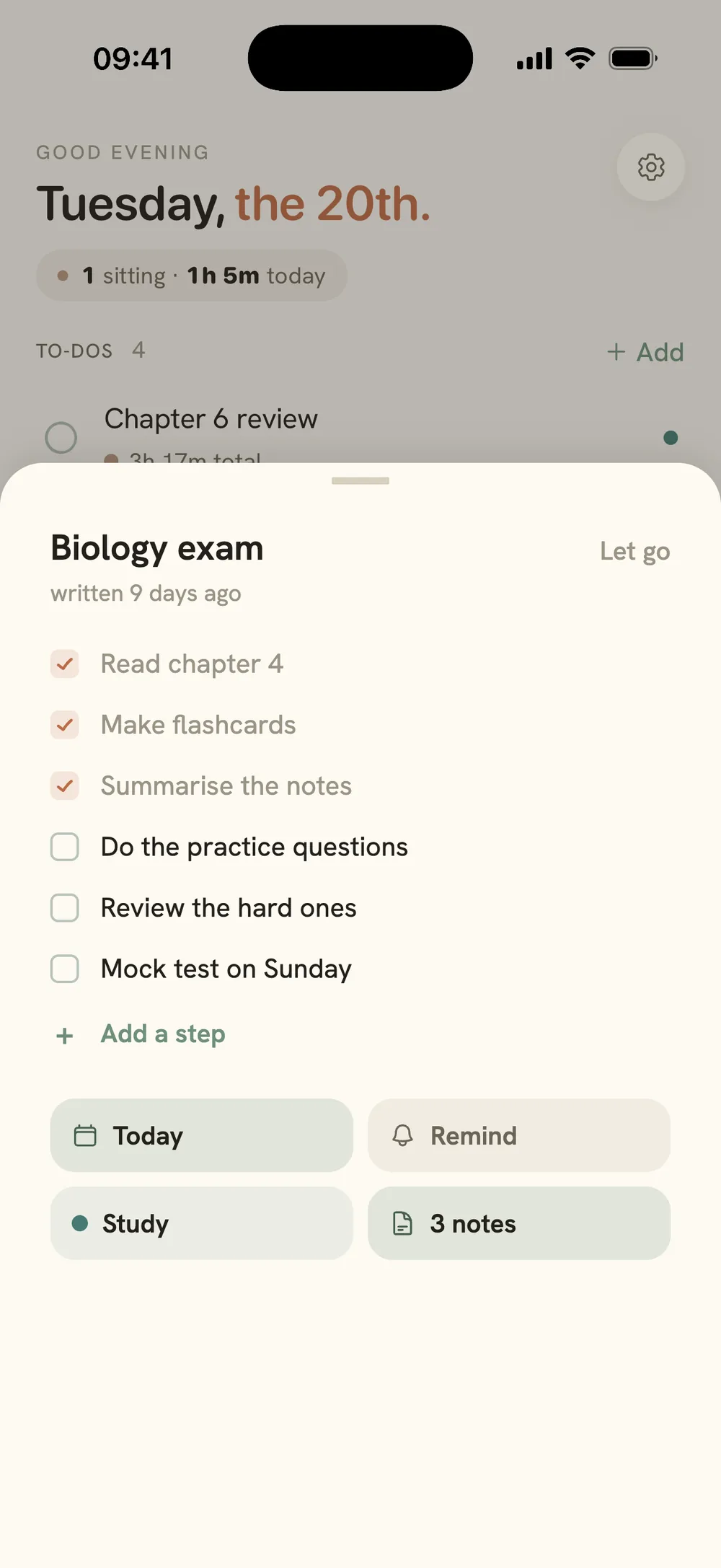
On Today, a to-do with steps shows a small square and a count like "2/4" under it, so you can see progress at a glance. When every step is ticked, the to-do stays open: you decide when it's done. Swipe a to-do right to start a focus session; it opens with 3 minutes to just start, then rolls straight into your first block, with the timer on your Lock Screen so your phone can stay locked. While the session runs, the line under the task name shows your next step (like "☐ Draft the methods ›"). Tap it to tick, add, reorder or rewrite a step without leaving the timer, and if the to-do has no steps yet, it offers "+ Add a step" right there, which is often exactly when you realise you need one.
There's no AI breakdown: you write your own steps. Steps, to-dos and unlimited focus sessions are free, with no streaks and nothing that turns red. Calibrate is on the App Store. If you just want a timer for your first step, there's a free focus timer in your browser too.
Common questions
How small should a step be?
Small enough that you know exactly what your hands do first, and short enough to finish in one session, roughly under half an hour. If you read a step and still feel the urge to think about it, it's too big. If you read it and could start right now, it's the right size.
What's the best app to break down tasks for ADHD?
Honestly, the one you'll open while you're working. Look for steps that live inside the task they belong to, ticking that's fast and visible, steps you can rewrite or split again without friction, and no pressure features like streaks or overdue red. Paper meets most of those. Calibrate is one option: a to-do list with steps inside each to-do and a focus timer that shows your steps while it runs.
Should I break down every task?
No. If you already know the first move and it doesn't scare you, just start. Breaking down is for tasks that stall: the ones that are vague, big, or have been carried from day to day. Splitting tasks that were already startable is planning instead of doing.
What if I still can't start the first step?
Make it smaller again, down to something physical: open the file, put the book on the desk, write the title. If it's still stuck, the problem is usually the start itself, not the size. Give the first step three honest minutes with permission to stop, and let that count.
Keep reading
How to start when you can't · Starting an assignment you don't want to do · The ADHD to-do list · How to do a brain dump · Free focus timer
One step you can start
Calibrate is on the App Store. Free to use, with unlimited focus sessions.
Get Calibrate