From stuckto started.
For when you know what to do and still can't start. A to‑do list and a calm focus timer: swipe a line to begin, and the timer stays on your Lock Screen.
Free to download · no account
For when you can't start
Swipe a to-do and you're in. Want it smaller? Ease in gives you three easy minutes first, and stopping there still counts.
For ADHD brains
A missed day is just a day, and a partial one still counts. Nothing to break, nothing to chase.
For students and deep work
Pomodoro-style blocks, a break that starts on its own when you answer, and an honest record of where the hours went.
How it works
Built for the moment you can't start.
Simple tools that get you going, keep you honest about how it went, and stay out of the way.
Planning
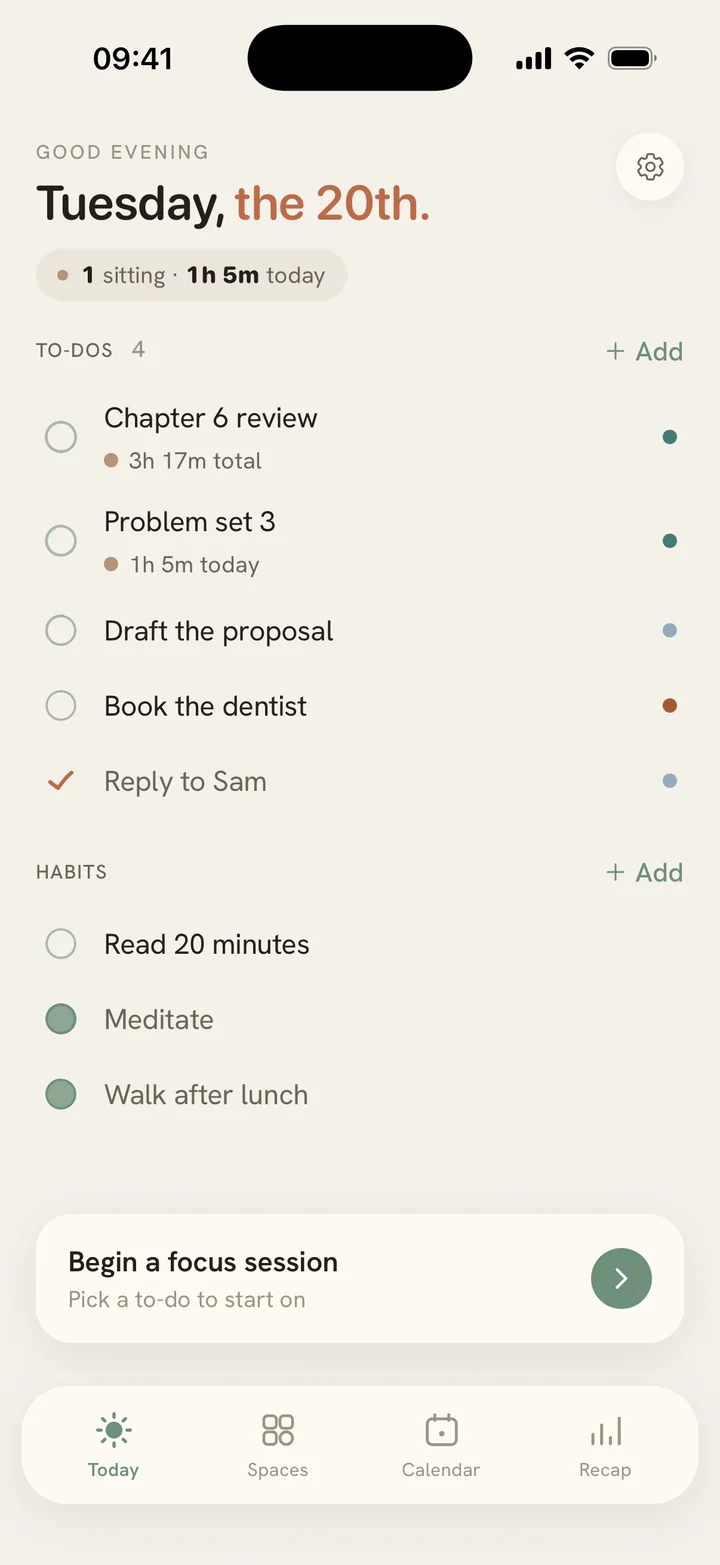
One short list for today.
Write what's on your mind as plain lines. Yesterday's unfinished ones come back one at a time, so nothing piles up quietly.
Starting
Start from your list.
Swipe any to-do and your first block begins. Want an easier way in? Turn on Ease in for three easy minutes first. Stopping there still counts.
Working
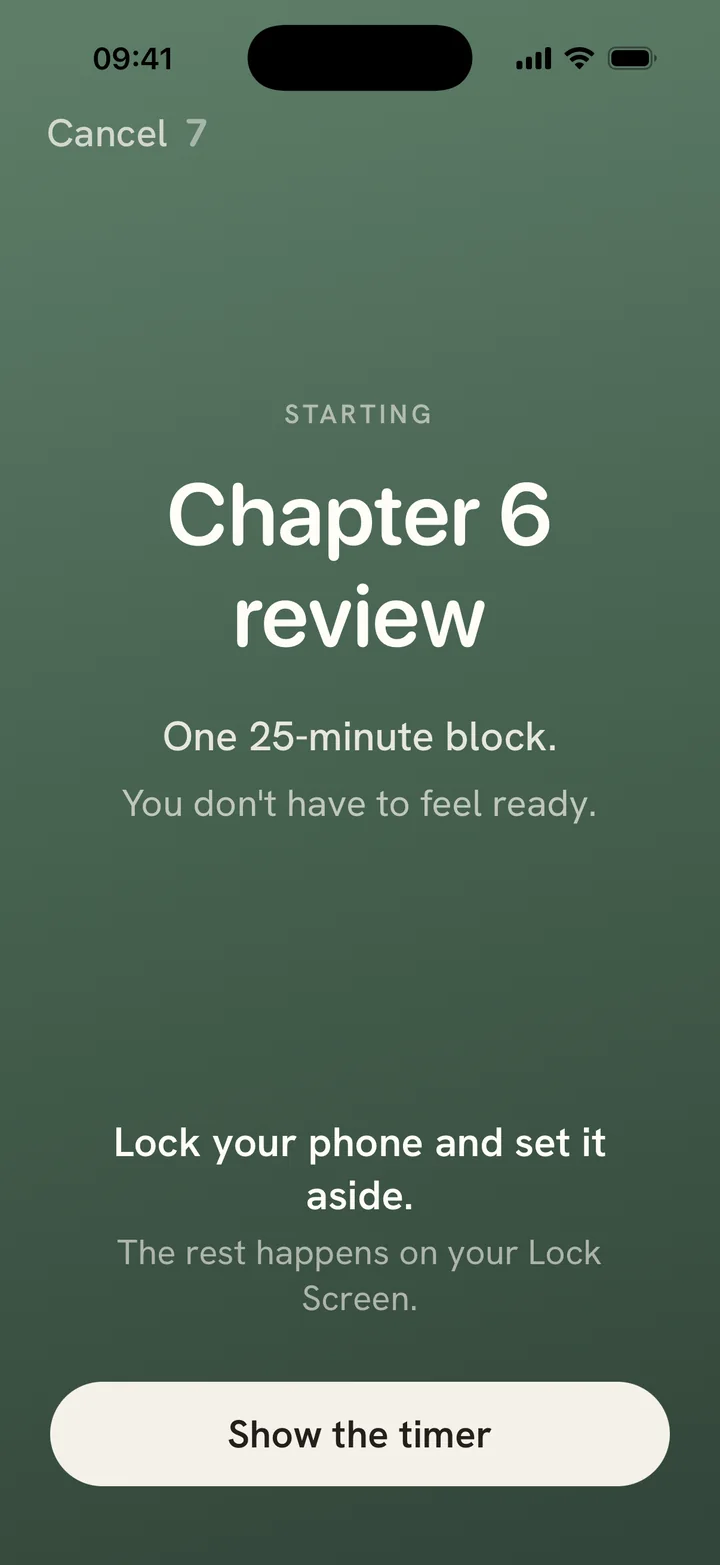
Your phone can stay locked while you work.
Each block ends with one question: how was your focus? Answer, and your break starts on its own. Need longer? Add five minutes. Back early? Tap I'm back. All without unlocking your phone, and check-ins come to your Apple Watch too.
Monday, September 7
9:41
18:42 left in block 2.
25:06 in block 2.End ›
How was your focus?
Before the scroll
A pause before the apps that pull you.
Pick the apps you open without meaning to. Before one opens, or after the minutes you choose, Calibrate shows one breath and a few lines from your own list. Then you choose. Nothing is blocked.
Uses Apple's Screen Time, on your phone. Calibrate never sees which apps you use.
One breath.
Then Instagram, or something from your list:
○ Reply to Sam about Friday
○ Read chapter 4
○ Book the dentist
Planning ahead
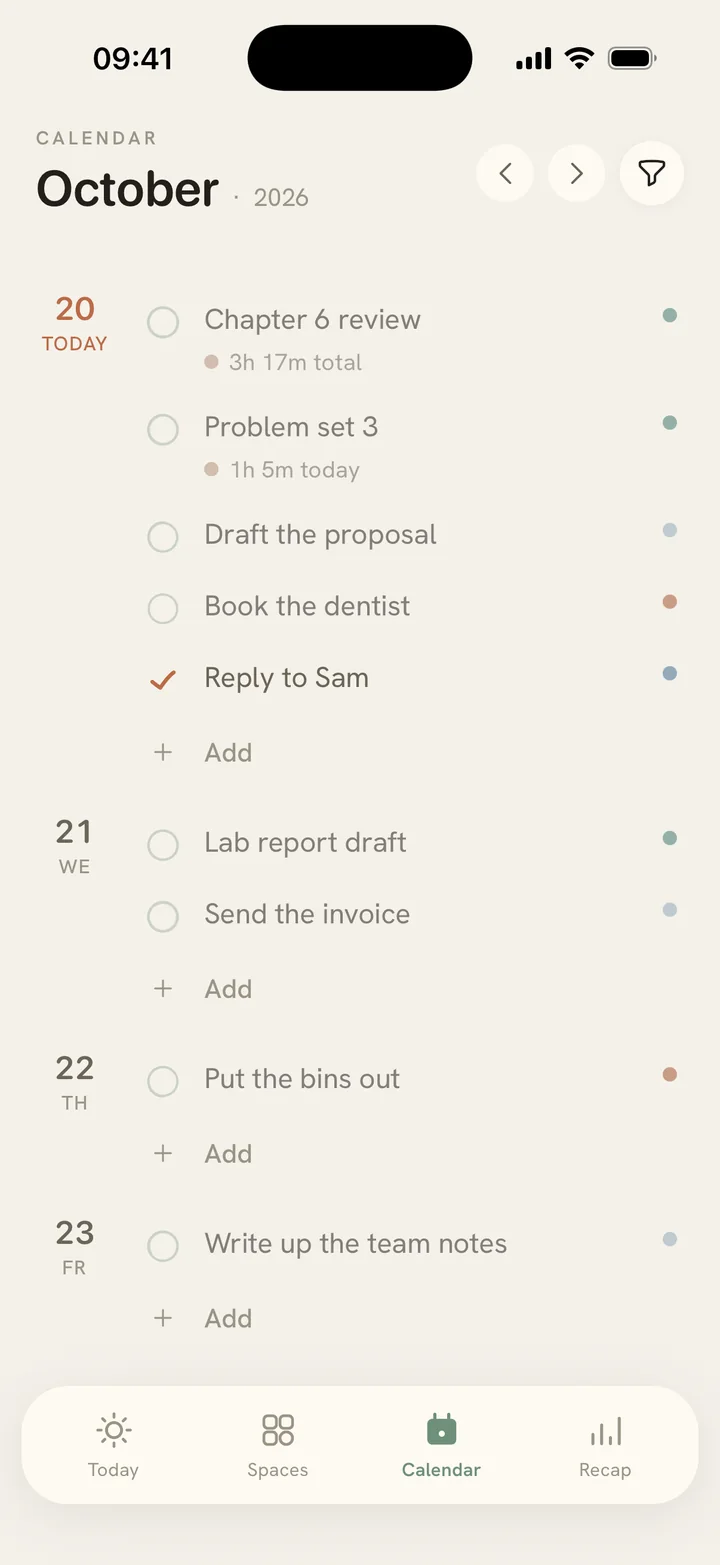
A light planner for the days ahead.
Put a line on any day in the Calendar, or keep it for someday. No times and no slots to keep: when the day comes, it's simply on your list.
Organising
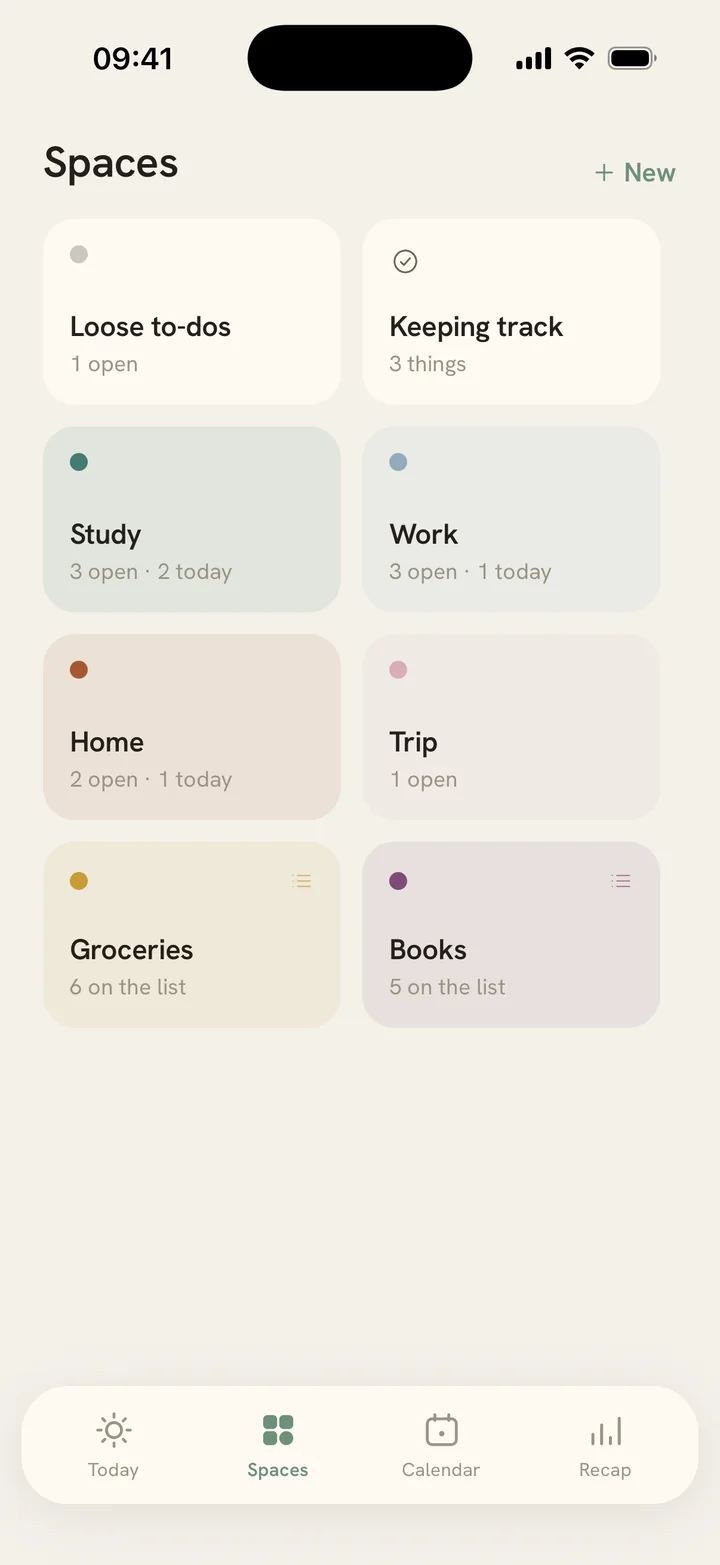
Everything in its place.
Spaces for what goes together, lists for groceries and packing, and keeping track of when you last did something.
Habits are there too, optional, and a partial day counts.
Looking back
You'll know where your week went.
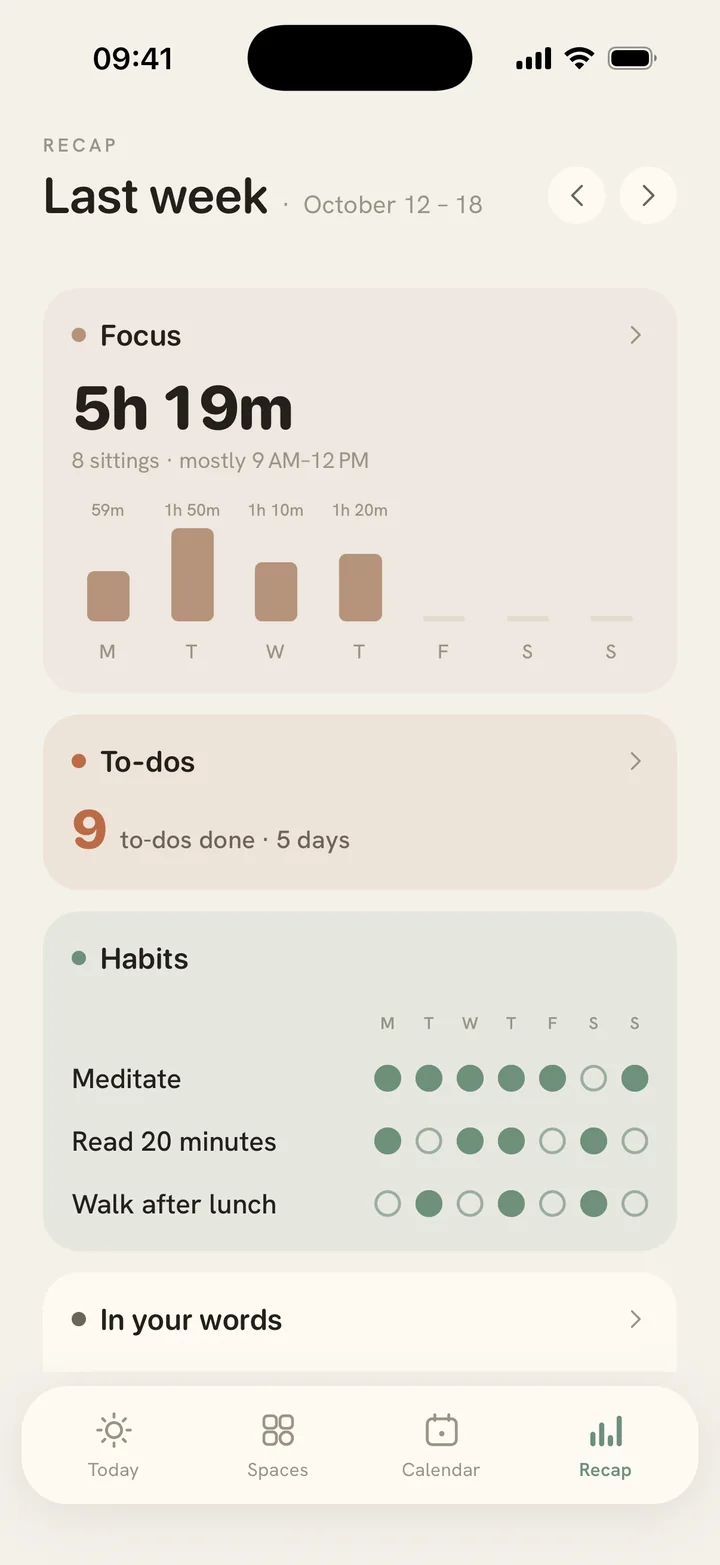
A weekly recap in four cards, facts not grades: your focus, your to-dos, your habits, and your own words.
The weekly recap is part of Calibrate Plus.
Try it now, in your browser.
The web timer starts with three minutes and asks how your focus went after each block. Free, no signup.
Open the free timerGuides
Attention, explained gently.
Short, honest guides on focus, distraction, and reflection, and where Calibrate fits in when a tool actually helps. Original numbers live in our focus app statistics.
Pricing
Start free. Stay for less than a coffee.
Focus sessions, to-dos, spaces, lists, keeping track, habit marks and the pause before apps are free, all of it, unlimited. Calibrate Plus adds the weekly recap: your week, your sharpest hours, and your habits over time. Your data lives on your phone either way.
Monthly
$3.99 / month
7-day free trial for new subscribers
Lifetime · founding price
$29.99 once
one payment, yours for good
Why I built this
Every focus app I tried turned my attention into a scoreboard. Streaks I was afraid to break. Graphs that told me I was behind. The tool that was supposed to calm my work became one more thing keeping score of me.
Calibrate is my answer: an app that asks how the last stretch actually went, says one true sentence about what it notices, and otherwise stays out of the way. Drifting isn't failure, it's information. Catching yourself is the real skill.
MJ, maker of Calibrate
Frequently asked
Things people ask.
Is Calibrate a pomodoro timer?
A gentler one. Calibrate runs familiar Pomodoro-style blocks, 25 minutes by default and yours to change. Each block ends with one question, how was your focus, and answering starts your break. The next block never starts by itself: you start it when you're back, right from your Lock Screen. Learn more →
How does Calibrate track distractions?
You tell it, in one tap: phone, noise, thoughts, or your own words. Over your last seven sessions it notices your most common pull and suggests one small change. No surveillance, no screen monitoring. Learn more →
Is Calibrate good for ADHD?
Calibrate avoids the mechanics that tend to backfire for ADHD brains: streaks to break, scores to fall behind on. When your attention drifts, the app records what pulled you without judgment and moves on. Learn more →
Can Calibrate help me start a task I keep putting off?
Yes. Swipe the to-do that's been waiting to the right and your first block begins. Want an easier way in? Turn on Ease in, and every sitting opens with three easy minutes. At minute three your Lock Screen says “You started.” Start a full block, or end there. Stopping there still counts. Learn more →
What is a daily intentions app?
A short list of what matters today, written fresh each morning. Not a backlog. In Calibrate, yesterday's unfinished lines come back one at a time: did it, carry, or let go. Learn more →
How is this different from Screen Time?
Screen Time measures and limits. Calibrate notices with you, and can add a pause before the apps that pull you, showing your own list instead of a wall. Learn more →
Does Calibrate block apps?
No. It can pause instead: before an app you picked opens, or after the minutes you choose, you see one breath and a few lines from your own list, then you choose. Open the app, or go to your list. Nothing is blocked. Learn more →
How fast can I capture a thought?
One tap, then type. The input opens in place with the keyboard ready; there's no separate add screen. While you type, a small bar above the keyboard lets you set a Space or a future day without leaving the line. Tap anywhere to save. A half-typed thought is never lost.
What are Spaces?
Optional contexts for your to-dos: Work, Learning, Home, whatever fits your life. Assign a line to a Space to keep things separate. A Space can also hold a list you keep rather than work you do, like groceries or packing. You can also ignore them entirely.
Can I schedule to-dos for future days?
Yes. In Calendar, write a line on any future day and it appears on Today when that day arrives. A to-do without a date waits in Someday until you give it one. Planning ahead never clutters today.
Can Calibrate remember when I last did something?
Yes. Keeping track is a last-done log for things with no schedule: the water filter, the mattress, the backups. Each entry shows when you last did it and your real rhythm, like “roughly every 3½ months”. Open the row and tap Mark today. Each mark can carry a note, so a car service keeps its mileage. Nothing ever turns red or overdue. Learn more →
Does Calibrate track habits?
Optionally. Habits are opt-in, and Today stays clean without them. Mark each day done, partly done, or skipped, from Today, or from your weekly recap with Calibrate Plus. Partial effort counts, missed days can be marked late, and there's no streak to break. Learn more →
Can I use Calibrate from my Lock Screen?
Yes. A running session lives on your Lock Screen and in the Dynamic Island as a Live Activity, and mirrors to your Apple Watch Smart Stack. You can answer how a block went, add five minutes to a break, tap I'm back, start the next block, or end the sitting, all without unlocking your phone.
Where is my data stored?
On your iPhone. Your to-dos, sessions, and the notes you write when a sitting ends live in a local database on your device. There's no account, and your writing never leaves your device.
How much does Calibrate cost?
Focus sessions, to-dos, spaces, lists, keeping track, habit marks and the pause before apps are free, all of it, unlimited. Calibrate Plus adds the weekly recap: your week, your sharpest hours, and your habits over time. Plus is $3.99 a month, with a 7-day free trial for new subscribers, or $29.99 once for life at the founding price. See pricing ↑
Less scrolling. More noticing.
Calibrate is on the App Store. Sittings are free, as many as you like. Start from your list.
Download on the App Store